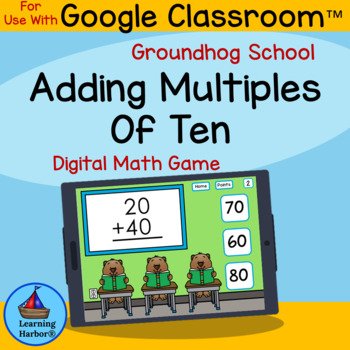
Groundhog Day Adding Multiples of 10 Google Slides™ Math Game is a Learning Harbor® Resources for Teachers Life Saver Activity for First Grade, and Second Grade. This fun digital math resource works for face-to-face learning using Google Classroom™ or Google Drive™. Students click a symbol to visit a random slide, solve an adding multiples of 10 equation, and self-check by clicking an answer. Immediate feedback builds confidence with “Way to Go!” for correct answers and “Try Again, You’ll Get It Next Time” for incorrect answers. Great for math centers, small groups, tutoring, RTI, early finishers, and spiral review. An engaging alternative to worksheets that saves prep time.
$3.00
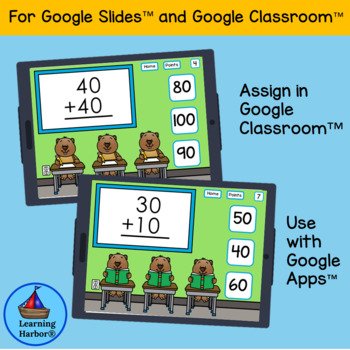
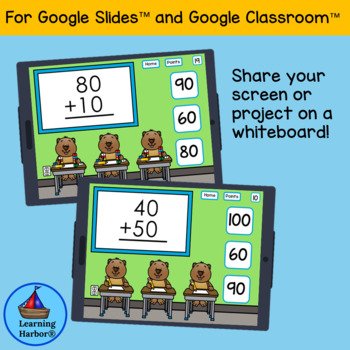

Groundhog Day Adding Multiples of 10 Math Game is an engaging digital math activity that gives students meaningful practice with adding multiples of 10 while keeping learning fun, structured, and encouraging. This Learning Harbor® Resources for Teachers Life Saver Activity is designed for today’s classroom needs, whether you teach face-to-face, use blended learning, or support students through distance learning.
In early elementary classrooms, students need repeated practice with place value concepts and addition patterns before they can move into higher-level math skills. Adding multiples of 10 is a perfect skill for building that foundation because it strengthens number sense while helping students recognize patterns in our base-ten number system. When students understand how numbers change as tens increase, they gain confidence that supports future work in addition, subtraction, and place value.
This Groundhog Day adding multiples of 10 themed math activity provides a dependable way for students to practice these skills without the stress of worksheets. Teachers are often looking for resources that are easy to assign, easy to manage, and fun for students. And that is exactly what this activity provides. It uses a simple routine that students quickly learn, allowing them to focus on the math instead of complicated directions.
Students begin on the home page by clicking a numbered symbol. That click takes them to a random slide featuring an equation involving the addition of multiples of 10. Students solve the problem and then choose an answer. If teachers would like students to show their work, students can write the equation and answer on paper, use a recording sheet, or record in a notebook. The resource works both ways—whether you want quick practice or accountability built in.
One of the most helpful features of this digital game is the immediate feedback it provides. Students do not have to wait for an answer key or teacher correction to know how they are doing. Instead, they learn right away:
When students choose correctly, a friendly “Way to Go!” slide appears.
When students choose incorrectly, a helpful “Try Again, You’ll Get It Next Time” slide appears.
This type of feedback supports student confidence while encouraging persistence. It also makes the activity excellent for independent work, since students can keep learning even if the teacher is working with a small group. This format is especially helpful for new teachers who want their students engaged and learning without constantly needing teacher support at every step.
Another helpful option included in this resource is the tally slide. Teachers can project the tally slide on an interactive white board for a fun whole-class challenge, or students can use the black-and-white points slide individually. This makes the activity flexible enough for many settings: whole group, small group, math centers, or early finisher work.
Because this resource is made for Google Drive™, it works smoothly across classroom technology. Students can use interactive white boards, desktops, laptops, and tablets that operate Google Apps™. It is easy to assign, simple for students to navigate, and ideal for building both math skill confidence and technology readiness.
Teachers know that creating high quality digital games takes time. This Learning Harbor® Resources for Teachers Life Saver Activity saves valuable planning time while still providing students with modern, engaging practice aligned to classroom standards. All Learning Harbor digital activities are designed to support Common Core aligned skills, helping teachers feel confident that student practice is meaningful.
Spiral review
Math stations/centers/rotations
Whole-class instruction
Independent practice
Partner work
Guided math small groups
Tutoring and intervention
RTI (Response to Intervention)
Homeschool learning
Early finishers
Enrichment and reinforcement
Computer lab and 1:1 device time
This Groundhog Day adding multiples of 10 themed digital math game is a smart, time-saving way to keep students learning, engaged, and encouraged while practicing a key early math skill. If you are looking for a dependable, classroom-tested activity that makes adding multiples of 10 feel fun and manageable, this resource will quickly become a favorite in your math toolbox.
⭐Related Products⭐
❤️ Bunnies and Chicks Eight Games For Teaching Teen Numbers
❤️ Football Fun Teaching Teen Numbers
❤️ Penguins Teen Numbers Tens Blocks and Ten Frames for Google Classroom™
❤️Snowman Teen Numbers Tens Blocks and Ten Frames for Google Classroom™
❤️ Thanksgiving Teen Numbers Tens Blocks and Ten Frames PowerPoint
How to get TPT credit to use on future purchases:
☀️Please go to your My Purchases Beside each purchase you’ll see a Provide Feedback button, simply click it and you will be taken to a page where you can give a quick rating and leave a short comment for the product. Each time you leave feedback TPT gives you feedback credits that you can use to lower the cost of your future purchases. I value your feedback greatly as it helps me determine which products are most valuable for your classroom so that Learning Harbor Resources for Teachers can make more for you.
Be the first to know about my new discounts, freebies, product launches, and special goodies for followers only:
☀️Look for the green star next to my store logo and click it to become a follower. Voila! You will now receive updates about Learning Harbor Resources for Teachers.